

The short answer
The AI agent lifecycle is the path an agent takes from the day someone requests it to the day it's switched off. Run it like staffing: a named person requests and owns each agent, it starts with the least access its job needs, its access is reviewed on a schedule, and it's retired completely when the work ends.


Published
What is the AI agent lifecycle?
Every business already has a lifecycle for people. Someone asks for a hire, a manager owns the role, the new person gets a laptop and the logins their job needs, and a year later someone checks whether that access still makes sense. When they leave, the accounts are closed the same week. Nobody thinks of this as security. It's just how a well-run office works.
The AI agent lifecycle is the same idea applied to the software that now does part of the work. An agent that drafts replies, updates the CRM or books meetings is a worker with logins. It should arrive through a request, belong to a named person, start small, be checked on, and leave cleanly.
What I've noticed, working with owners as they bring agents in, is that the first two stages usually happen and the last two usually don't. People are careful when they add an agent because it feels new. Nobody feels the same pull to check on it in month six, and almost nobody remembers to retire it.

Why the AI agent lifecycle needs an owner
The numbers explain why the end of the AI agent lifecycle matters most. The 2026 Identity Security Landscape (opens in a new tab) from Palo Alto Networks counts 109 machine identities for every human one, and each of them is a login someone has to remember to close.
Old credentials don't fade on their own. GitGuardian's State of Secrets Sprawl 2026 (opens in a new tab) followed valid secrets that were exposed in public code in 2022, and four years later 64% were still active and exploitable. When nobody remembers a key exists, nobody rotates it or revokes it.
OWASP puts this problem first on its Non-Human Identities Top 10 (opens in a new tab). Improper offboarding (opens in a new tab) (NHI1) is the inadequate deactivation or removal of service accounts and access keys when they are no longer needed. One of OWASP's own examples is a developer who leaves while an access key their application relied on stays active and unnoticed. That's a lifecycle failure, and a process fixes it better than a product does.
The same State of Secrets Sprawl 2026 (opens in a new tab) data shows how few get cleaned up: 66% of the valid secrets exposed in 2023 were still valid, 70% from 2024 and 77% from 2025.

Still valid is highest in 2025 at 77%.
| Still valid | |
|---|---|
| 2022 | 64 |
| 2023 | 66 |
| 2024 | 70 |
| 2025 | 77 |
The four stages of the AI agent lifecycle
I find it helps to use the words a business already uses for people. Owners and office managers know how to run hiring, onboarding, reviews and exits. Using that vocabulary makes the AI agent lifecycle feel familiar, and familiar processes are the ones that actually get followed.
Request: who asks for an agent, and who owns it
Every agent starts with a request that answers three questions: what job will it do, whose behalf will it act on, and who is its agent owner. The owner is a person, never a team or a vendor. They decide what the agent may touch, they answer for what it does, and they're the one who says when its job is over.
The joint guidance from the US, UK, Australian, Canadian and New Zealand cyber agencies, Careful adoption of agentic AI services (opens in a new tab), asks organizations to define legal accountability and risk ownership for agentic AI systems in their policies. A named owner on every request is the smallest version of that, and it's enough for most businesses.
Onboarding AI agents: what it gets on day one
Onboarding AI agents should feel a lot like a new hire's first week. The agent gets its own identity, never a borrowed login, and only the access its first task needs. It starts on low-risk work, like drafting or summarizing, and anything that sends, posts, pays or deletes waits for a person.
The joint guidance calls this progressive deployment: start with phased access and autonomy, and widen it as people understand what the agent does well. It also recommends keeping a trusted registry of agents bound to their authorized roles. For a small business, that registry can be one page: the agent, its job, its owner, what it can reach, and the date it started.
Access review: checking in on a schedule
An access review asks whether each agent still needs what it has. Agents collect permissions the same way people do. Someone grants broad access to get a demo working, a new task gets added in a hurry, and six months later the agent that writes newsletters can also edit the customer list.
NIST's Cybersecurity Framework 2.0 (opens in a new tab) asks that access permissions be defined in a policy, managed, enforced and reviewed, built on least privilege, in PR.AA-05. The joint guidance asks you to periodically reconcile the agent registry against the live set of agents and to deny access to any agent that isn't on it. In practice that's a short meeting: the owner looks at each agent's access and its recent activity and says keep, narrow or retire.
Offboarding AI agents: retiring it cleanly
Offboarding AI agents means more than turning the agent off. Its keys and tokens are revoked, the standing approvals it held are taken back, the tools it connected are disconnected, and its record stays in the log so you can answer questions later. OWASP's advice for improper offboarding is an offboarding process that reviews the non-human identities tied to departing employees, and periodic checks that each one is still in use, still needed and still has a valid owner.
The trigger matters as much as the checklist. An agent should be retired when its job ends, when its owner leaves the company, or when a review finds nobody can say what it's for. That last case is common in businesses that tried several AI tools in a short time.
The AI agent lifecycle in a 5 to 50 person business
A business of 5 to 50 people doesn't need a governance committee for this. It needs one list, one owner per agent, a calendar reminder for reviews, and the habit of adding agents to the same exit checklist used when a person leaves. Most of the work is deciding who does each step, and that decision only has to be made once.
Request
A named person asks for the agent, says what job it will do, and becomes its owner.
Onboarding
The agent gets its own identity and only the access its first task needs.
Access review
The owner checks on a schedule whether the agent still needs what it has.
Offboarding
Its keys are revoked, its standing approvals are taken back, and its record stays in the log.

Where the AI agent lifecycle breaks, and the fix for each
These are the gaps I see most when we walk through a business's agents with the owner, and each one has a simple fix.
- Nobody owns the agent. It was set up by someone who has since moved on, and nobody feels able to switch it off. The fix: no agent without a named owner, and ownership moves when people do.
- The agent runs on a person's login. OWASP lists the reverse as NHI10, human use of non-human identities, and both blur who did what. The fix: agents get their own identities, and people use their own.
- Access only grows. Every new task adds a permission and nothing ever takes one away. The fix: an access review on a schedule, with least privilege as the default answer.
- The person leaves and the agent stays. The fix: the staff exit checklist includes every agent that person owned or created.
- The agent is switched off but its keys aren't. The fix: offboarding revokes credentials and takes back standing approvals, then checks the log for any use after that date.
- Revoke keys and tokens. Every key and token the agent held is revoked.
- Take back standing approvals. The standing approvals it held are taken back.
- Disconnect its tools. The tools it connected are disconnected.
- Keep its record. Its record stays in the log so you can answer questions later.
- Check for later use. The log is checked for any use after the retirement date.

The human side of the AI agent lifecycle
Most lifecycle failures aren't technical. They come from ordinary habits. People assume someone else turned the old tool off. They keep an agent running because removing it feels riskier than leaving it. They grant one more permission because the deadline is today and the review is a problem for later.
I've found the fix is to make the right step the easy one. When adding an agent to the list is part of setting it up, it happens. When the review is a short, scheduled check with the owner's name on it, it gets done. When retiring an agent is a checklist instead of a judgment call, people stop putting it off. A written AI agent lifecycle means nobody has to remember each step on their own.
Brian and I split Kief Studio between technology and operations, and the lifecycle sits where the two meet. His page on AI agent permissions covers what each agent can touch. My half, on the operations side, is how agents get added and retired: every agent has a person's name next to it, and a date when someone will look at it again.

What the standards ask of the AI agent lifecycle
None of this is a new expectation invented for AI. The frameworks a business may already answer to cover it once you read agents as users.
NIST and the joint guidance
NIST CSF 2.0 asks, in ID.AM-08, that systems, hardware, software, services and data are managed throughout their life cycles, and in PR.AA-05 that permissions are reviewed. The joint agency guidance adds agent-specific steps: a trusted registry, delegations that expire, and logging of identity and privilege changes with regular audits for drift.
Massachusetts: 201 CMR 17.00
If you hold personal information about Massachusetts residents, 201 CMR 17.00 (opens in a new tab) already reads like a lifecycle checklist. Section 17.03 asks you to prevent terminated employees from accessing records containing personal information and to review the scope of your security measures at least annually. Section 17.04 asks for access restricted to active users and active user accounts only. An agent nobody retired is the kind of account that control is aimed at: it can still reach records, and nobody is actively using or watching it.

What we've learned running agents as staff
Our own AI staff at Kief Studio work on LTFI, and these lessons come from running them through this lifecycle.
- Treat the first month as probation. Watch the log closely, approve everything, and widen access only after the agent has earned it on real work.
- Write the job down before choosing the access. When the job is one clear sentence, the right access is obvious and the extra access looks out of place.
- Put agents on the same exit checklist as people. It's the cheapest control we know, and the one most often missing.
- Retire agents you've outgrown instead of repurposing them. A new agent with a fresh, narrow job is easier to reason about than an old one with history.

How LTFI supports the AI agent lifecycle
LTFI is the agentic business operating system Kief Studio makes and runs. These are the controls it ships with today that carry each stage.
- Each AI teammate owns one job, and you talk to one chief of staff, which hands out the work.
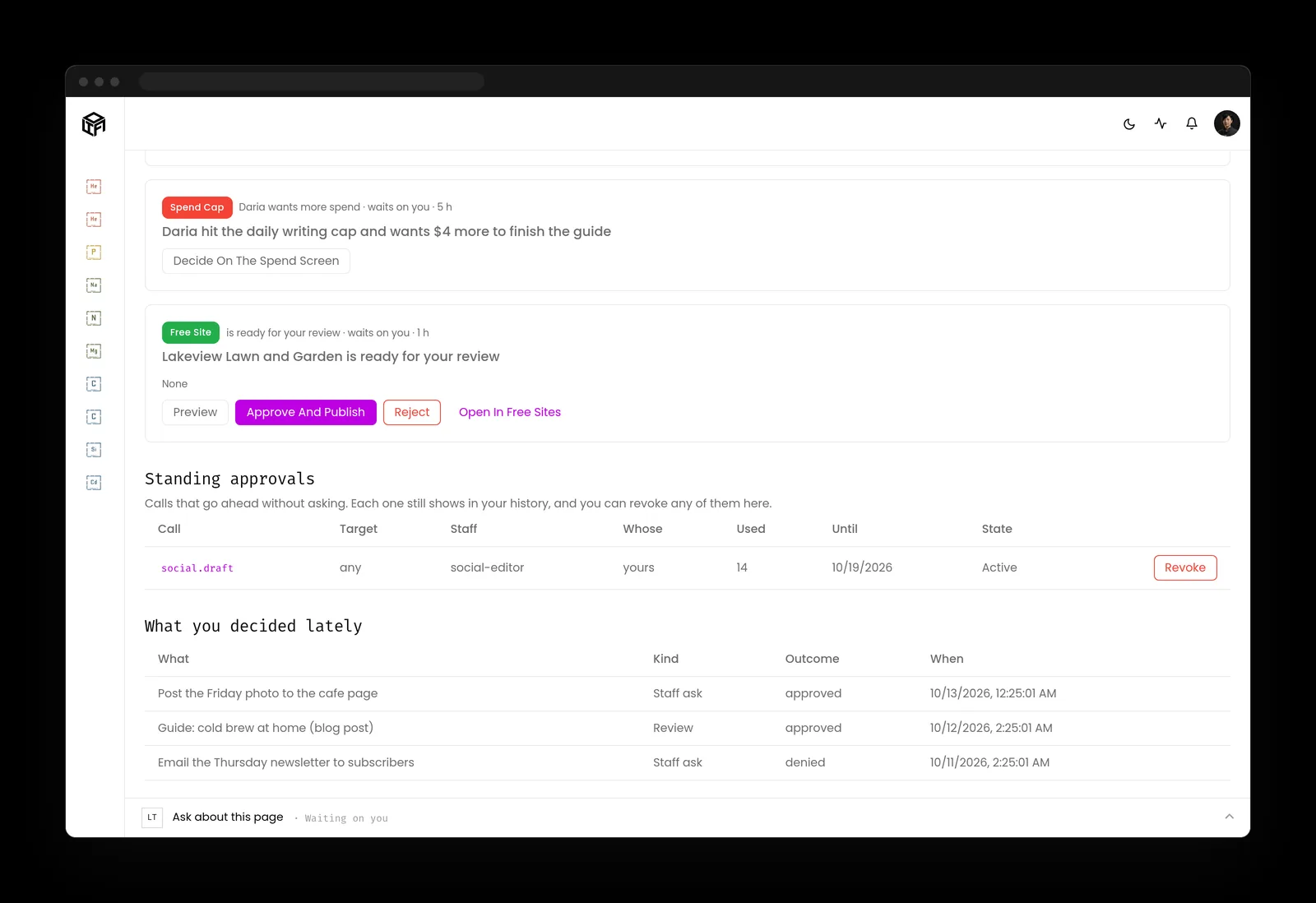
- New AI staff start with every outgoing action waiting for a Go ahead until you say otherwise.
- Standing approvals are given for one kind of work and taken back at any time.
- Rules, permissions, credentials, deleting and money stay with people. An AI teammate can't change them.
- A new skill is saved as a draft, and AI staff don't use it until a person approves it.
- The activity log records every action by the staff and the team, with who approved it.
What to do about the AI agent lifecycle this month
Two lists: one for the person who owns the business, one for whoever runs its systems.
If you own the business
- Make a list of every AI agent and AI tool connected to company systems, with its job and its owner.
- Ask about each one without an owner: does anyone still need it? If nobody can answer, retire it.
- Add agents to your staff exit checklist, so a person's departure triggers a look at what they set up.
- Put a recurring access review on the calendar, and keep it short.
If you run the systems
- Keep an agent registry with identity, owner, job, scopes and start date, and reconcile it against what's actually running.
- Issue every agent its own identity and credentials that expire, so retirement is a revocation, not a hunt.
- Log identity and privilege changes and review them for drift on the same schedule as human access.
- Write an offboarding runbook: revoke keys and tokens, remove standing approvals, disconnect tools, then check the log for later use.
Key takeaways
- The AI agent lifecycle runs like staffing: request, onboarding, review and retirement.
- Every agent needs a named person as its owner, and ownership moves when people do.
- Access reviews keep least privilege true over time, because permissions only grow on their own.
- Offboarding AI agents means revoking credentials and approvals, which is the step most often missed.
Where this lines up with the standards
The frameworks and rules this page maps to, with the exact item and what it asks of you.
| Framework | Item | What it asks |
|---|---|---|
| OWASP Non-Human Identities Top 10 | NHI1 Improper Offboarding; NHI10 Human Use of NHI (opens in a new tab) | Offboard machine identities that are no longer needed, recertify owners, and keep people off machine identities. |
| NIST CSF 2.0 | ID.AM-08, PR.AA-05 (opens in a new tab) | Manage systems and services throughout their life cycles, and review access permissions against least privilege. |
| Joint agency guidance | Careful adoption of agentic AI services (opens in a new tab) | Keep a trusted agent registry, reconcile it, deploy progressively, and assign risk ownership. |
| OWASP Top 10 for Agentic Applications | ASI03 Identity and Privilege Abuse, ASI10 Rogue Agents (opens in a new tab) | Keep agent privileges narrow over time, and catch agents acting outside their purpose. |
| Massachusetts | 201 CMR 17.00 (opens in a new tab) | Cut off access when people leave, restrict access to active accounts, and review security measures at least annually. |