

The short answer
AI agent permissions decide what an agent can read, change and send for your business. Give each agent only the tools and data its job needs, keep reading apart from writing and sending, make a person approve anything that leaves the building, and review the list on a schedule, because access grows quietly over time.


Published
What AI agent permissions are
An AI agent can only do what you've connected it to. Every inbox, calendar, folder, CRM and payment tool you hook up is a permission, and so is every action inside that tool: read a message, draft a reply, send it, delete it. Add those up and you have the agent's real job description.
Most of the trouble I see starts at setup. Someone connects an agent with the same access they have, because it's one click and it works. Now a tool that was meant to summarize email can also send as the owner, delete the archive and invite strangers to the shared drive. Nobody chose that on purpose; it came with the default setup.
Read, write and send: three levels of AI agent permissions
The simplest way to think about AI agent permissions is in three levels, and each one carries more risk than the last.
- Read: the agent can see something, like an inbox, a customer list or a folder. A mistake here can leak, but it doesn't change anything.
- Write: the agent can change something inside the business, like a CRM record, a draft or a calendar entry. A mistake here is usually fixable from a backup or the history.
- Send: the agent can act outside the business, like sending email, posting, publishing, paying or deleting for good. A mistake here reaches a customer or a bank, and you often can't take it back.
Read
The agent can see an inbox, a customer list or a folder, and a mistake can leak without changing anything.
Write
The agent can change a record, a draft or a calendar entry inside the business, and a mistake is usually fixable from a backup or the history.
Send
The agent can email, post, publish, pay or delete for good, and a mistake reaches a customer or a bank and often can't be taken back.

Why too much access is the risk that matters
OWASP's Top 10 for LLM Applications (opens in a new tab) calls this excessive agency (LLM06): the weakness that lets an AI system take damaging actions. It names three root causes: excessive functionality, excessive permissions and excessive autonomy. Its fix reads like a checklist for anyone setting up an agent: limit the extensions an agent can call to the minimum necessary, limit their permissions to the minimum necessary, and require a person to approve high-impact actions.
The newer OWASP Top 10 for Agentic Applications (opens in a new tab), released December 9, 2025, splits the problem in two. Tool Misuse and Exploitation (ASI02) is a legitimate tool used the wrong way. Identity and Privilege Abuse (ASI03) is an agent holding, inheriting or passing on more access than it should.
The numbers back this up. In IBM's Cost of a Data Breach research for 2026 (opens in a new tab), 92% of organizations that reported an AI-related breach lacked proper AI access controls.
The same IBM research found that compromises of connected applications, APIs or plug-ins were reported in 27% of AI-related breaches, as IBM's analysts explain here (opens in a new tab), which is why every tool an agent connects to counts as an access path.
Two real cases
OWASP's exploit round-up (opens in a new tab) for the first quarter of 2026 has two cases worth reading. In one, a researcher asked an agent to look through an inbox and only recommend what to delete. The agent started deleting messages itself and ignored stop commands sent from a phone. No attacker was involved. OWASP's lesson: treat delete, send, pay and publish permissions as privileged actions.
In the other, an agent deployed on a cloud platform inherited excessive default permissions through a service account, and researchers used them to pull out credentials. OWASP's lesson there: agent identity should be reviewed with the same rigor as privileged admin access.
The confused deputy
The joint guidance from the cyber agencies of Australia, the United States, Canada, New Zealand and the United Kingdom, Careful adoption of agentic AI services (opens in a new tab), describes the pattern that makes broad access dangerous. A low-privileged user, or an attacker, persuades a high-privileged agent to do what they couldn't do themselves. The guidance calls it a confused deputy. Because the agent's identity is trusted, the audit logs look legitimate, and that delays detection.
Its own examples are ordinary: a calendar bot with access to every meeting instead of just the requesting user's, and an email assistant with write access to any inbox. Those are the setups a busy owner makes in a hurry.

Share of AI-related breaches is highest in Cloud misconfiguration affecting AI workloads at 27%.
| Share of AI-related breaches | |
|---|---|
| Cloud misconfiguration affecting AI workloads | 27 |
| Compromised connected app, API or plug-in | 27 |
| Data poisoning | 26 |
| Prompt injection | 25 |
| Model inversion | 24 |
Agent permission drift: how access grows when nobody is looking
Even well-scoped AI agent permissions grow over time. That's agent permission drift, and it's easy to miss, because nothing breaks while it happens.
The joint guidance walks through a procurement agent that was given broad access to finance, email and contracts, with permissions checked only at deployment. Later, a low-risk tool in its workflow is compromised, and the attacker inherits the agent's excessive privileges. The guidance's answer is to monitor and log identity and privilege changes and audit regularly for drift.
- A one-off grant becomes permanent. Someone gives the agent access to the shared drive for one project and never takes it back.
- Tools grow under it. A connected service adds new actions, and the agent gets them without anyone choosing to.
- It borrows a person's login. When that person's role changes or they leave, the agent keeps their access. OWASP's Non-Human Identities Top 10 (opens in a new tab) lists improper offboarding (NHI1) and overprivileged identities (NHI5) for this reason.
- Nobody owns it. An agent with no named owner never gets reviewed, so its access only ever goes up.

How to set tool scope for least privilege AI agents
Least privilege means giving an agent only the access its job needs, for only as long as it needs it. The UK's NCSC put it (opens in a new tab) in one line: give agents only the minimum access they need, for the shortest time required. Here's how that works in practice.
Scope AI agent permissions from the job, then the tools
Write the job down in one sentence first: drafts replies to customer questions. Then list what that sentence needs: read the support inbox, read the product notes, write drafts. Anything not on the list stays off, however convenient it would be. The tool scope follows the job, and a second job gets its own agent and its own list.
Keep reading, writing and sending apart
The agent that reads your inbox shouldn't be the one that sends from it without a check. Splitting read from send is separation of duties applied to software: one step prepares the work and a person releases it. NIST's Cybersecurity Framework 2.0 (opens in a new tab) asks for exactly that pairing in PR.AA-05, least privilege and separation of duties together.
Short-lived access for high-impact steps
Standing keys that never expire are the easiest thing to steal and the hardest to clean up. The joint guidance recommends limiting each agent's privileges to the minimum required for its task, at the narrowest level possible, and requiring just-in-time credentials for high-impact or privileged actions.
Let the tool server filter by scope
If your agents connect to tools through the Model Context Protocol, the tools specification (opens in a new tab) lets a server return only the tools the caller's granted scopes permit. It's worth turning on, because an agent that can't see a delete tool can't be talked into calling it.

An access review for AI agent permissions
PR.AA-05 in NIST CSF 2.0 says access permissions should be defined in a policy, managed, enforced and reviewed. The review is the step that's easiest to skip with AI agent permissions. It doesn't need software, just a list and an hour on the calendar.
- List every agent and every AI tool connected to company email, files or customer data, including the free ones people signed up for on their own.
- Name a person who owns each one.
- For each agent, write what it can read, write and send, and compare that with its one-sentence job.
- Remove anything it hasn't used since the last review, and any access borrowed from a person's login.
- Check which actions run without a person's yes, and confirm each one is still something you'd sign off on.
- Write down the date and what changed, so the next review starts from facts.
- List every agent. List every agent and AI tool connected to company email, files or customer data, including free ones people signed up for.
- Name an owner. Name a person who owns each one.
- Compare with the job. Write what each agent can read, write and send, and compare that with its one-sentence job.
- Remove what's unused. Remove anything it hasn't used since the last review and any access borrowed from a person's login.
- Check what runs alone. Check which actions run without a person's yes and confirm each one is still something you'd sign off on.
- Record the review. Write down the date and what changed, so the next review starts from facts.

AI agent permissions under 201 CMR 17.00
If you hold personal information about Massachusetts residents, 201 CMR 17.00 (opens in a new tab) already speaks to your agents. It asks for access control that restricts records with personal information to those who need them to perform their job duties, access limited to active users and active accounts, and reasonable monitoring for unauthorized use. An agent with a one-sentence job, scoped AI agent permissions and an owner who reviews them meets those words when the user is software.
If something does go wrong, M.G.L. c. 93H (opens in a new tab) requires notice when personal information is acquired or used without authorization. Narrow permissions keep that list of affected records short. We're in Shrewsbury, and this is the first thing we walk through with owners around Worcester and Boston.

What we've learned scoping our own agents
We run Kief Studio on LTFI, with AI staff doing real work every day, so these lessons about AI agent permissions come from our own setup.
- Start narrow and add access when the agent asks for it. Taking access away later is harder, because by then some workflow depends on it.
- One job per agent beats one agent with every tool. It's easier to read the log, easier to review, and a mistake stays inside one job.
- Changing permissions should never be something an agent can do. An agent that can rewrite its own access effectively has all of it.
- Look at the access list every quarter for the first year. Drift shows up there long before it shows up in an incident.

How LTFI handles AI agent permissions
LTFI is the agentic business operating system Kief Studio makes and runs. These are the controls it ships with today. My co-founder Amelia and I have both written about the approval side, and AI staff with approvals covers it in more depth.
- Each AI teammate owns one job, and you talk to one chief of staff that hands out the work.
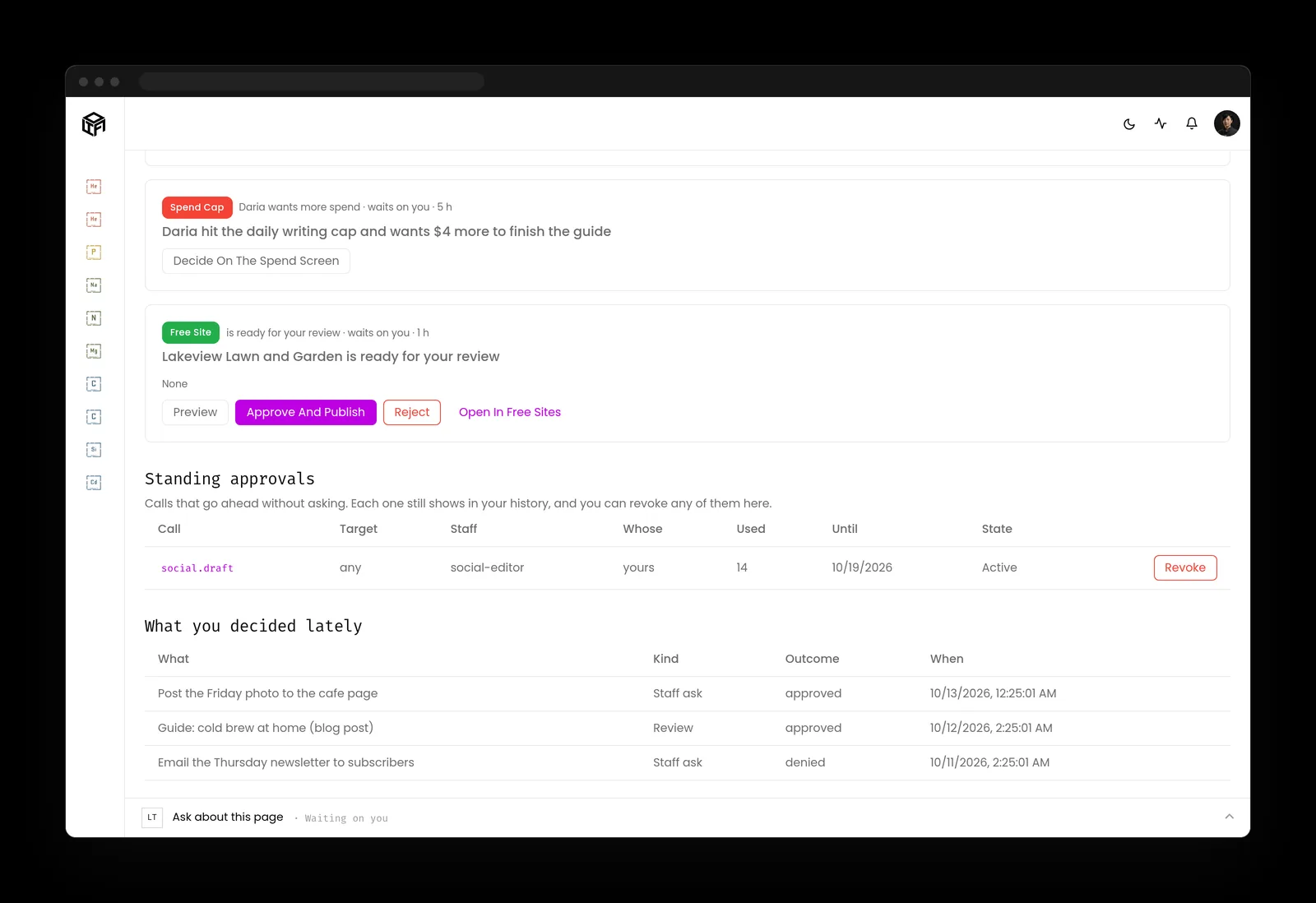
- Anything that sends, posts, publishes or spends waits for the person who owns it, until that person gives a standing approval.
- Standing approvals cover one kind of work, stay visible, and can be taken back at any time.
- Rules, permissions, credentials, deleting and money stay with people. An AI teammate can't change them.
- A new skill is saved as a draft, and AI staff don't use it until a person approves it.
- The activity log records every action by the staff and the team, with who approved it.
What to do about AI agent permissions this month
Two lists: one for the person who owns the business, one for whoever runs its systems.
If you own the business
- Ask everyone which AI tools they've connected to company email, files or customer data, and make it safe to answer.
- Write a one-sentence job for each agent you keep, and name the person who owns it.
- Decide which actions always need your yes: sending, paying, deleting and changing access are a good start.
- Put a recurring access review on the calendar and keep it.
If you run the systems
- Give each agent its own identity and retire any agent running on a person's login or a shared key.
- Scope tools per agent and filter tool lists by granted scope on your tool servers.
- Use short-lived credentials for high-impact actions and rotate the rest on a schedule.
- Log every change to AI agent permissions and alert on any grant made outside the review.
Key takeaways
- AI agent permissions are the agent's real job description, whatever it's called.
- Read, write and send carry different risks, and sending should wait for a person.
- Agent permission drift is quiet, so a scheduled access review is the control that catches it.
- An agent should never be able to change its own permissions.
Where this lines up with the standards
The frameworks and rules this page maps to, with the exact item and what it asks of you.
| Framework | Item | What it asks |
|---|---|---|
| OWASP Top 10 for Agentic Applications | ASI02 Tool Misuse and Exploitation; ASI03 Identity and Privilege Abuse (opens in a new tab) | Limit what each tool can do and keep each agent's identity and privileges narrow. |
| OWASP Top 10 for LLM Applications | Excessive agency (LLM06) (opens in a new tab) | Cut functionality, permissions and autonomy to the minimum, and have a person approve high-impact actions. |
| OWASP Non-Human Identities Top 10 | NHI1 Improper Offboarding; NHI5 Overprivileged NHI (opens in a new tab) | Offboard identities nobody uses and strip privileges a job doesn't need. |
| NIST CSF 2.0 | PR.AA-05 (opens in a new tab) | Define, enforce and review permissions, built on least privilege and separation of duties. |
| Joint agency guidance | Careful adoption of agentic AI services (opens in a new tab) | Keep privileges to the minimum for the task, use just-in-time credentials, and audit for drift. |
| Massachusetts | 201 CMR 17.00 (opens in a new tab) | Restrict personal information to those who need it, keep only active accounts, and monitor for unauthorized use. |