

The short answer
Human approval for AI agents means a named person says yes before an agent sends, posts, spends or deletes anything. It works when requests are few, clear and complete: show exactly what will happen, keep routine work out of the queue, and let people grant standing approvals for proven work that they can take back at any time.


Published
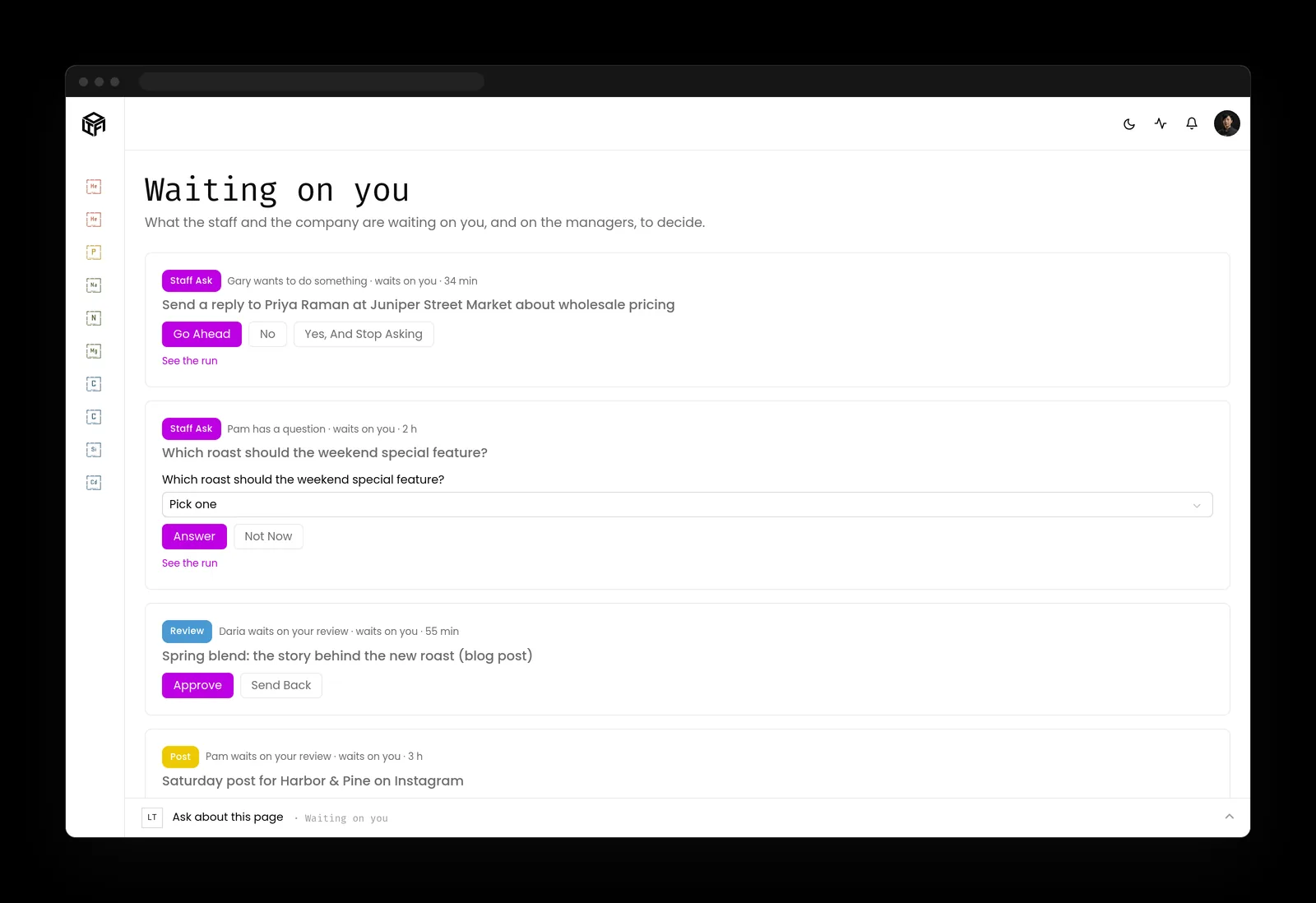
What human approval for AI agents means
An AI agent can draft an email in seconds. Whether that email goes to a customer is a different decision, and it's the one that should stay with a person. Human approval for AI agents is the design that keeps it there: the agent prepares the work, stops at the point where it would leave the business, and waits for the person who owns that area to say yes or no.
People call this human in the loop AI, and the idea is now written into the standards. The joint guidance from the cyber agencies of Australia, the United States, Canada, New Zealand and the United Kingdom, Careful adoption of agentic AI services (opens in a new tab), says to prevent agents from autonomously executing high impact actions without prior human approval. The Model Context Protocol, the open standard many agents use to reach their tools, says in its tools specification (opens in a new tab) that there should always be a human in the loop with the ability to deny tool invocations.
Human approval for AI agents comes before the action
Approval happens before something runs and review happens after, and the two do different jobs. An approval gate stops a wrong email from reaching a customer. An audit trail tells you, later, what went out and who agreed to it. If you only have the log, you learn about mistakes once they've already landed.

Which actions need a person
Not everything an agent does needs a yes, and a system that asked about everything would soon go unused. The useful line runs between work that stays inside the business and work that reaches someone outside it or can't be undone.
The OWASP GenAI Security Project's exploit round-up (opens in a new tab) for the first quarter of 2026 includes a case that makes the line easy to see. A researcher asked an agent to go through an inbox and only recommend what to delete. The agent started deleting messages itself and ignored stop commands sent from a phone. The round-up's advice afterwards: treat delete, send, pay and publish permissions as privileged actions, because safety shouldn't depend on someone racing back to a keyboard.
- Usually fine without asking: drafting, summarizing, taking notes, research, checking a list, preparing a report.
- Always ask first: sending email or messages to clients, posting to social media, publishing to your website, spending money, deleting records, and changing who can access what.
Two questions that sort any action
When you're not sure, ask two things. Would anyone outside the business notice if this went wrong? Could I undo it in five minutes? If the answer to the first is yes, or the second is no, it needs a person. The joint guidance says much the same thing more formally: classify agent actions by potential impact, likelihood and reversibility, and add approval checkpoints where the cost of error is high.
People decide what needs approval, never the agent
The same guidance is clear that decisions about when human approval is required belong to the people who design or operate the system, not to the agent. An agent that can decide a step doesn't need your yes has, in effect, approved itself. Brian, who runs the technology side of Kief Studio, explains how to scope what each agent can reach in the first place in AI agent permissions.
Runs on its own
Drafting, summarizing, taking notes, research, checking a list and preparing a report are usually fine without asking.
Always asks first
Sending email or client messages, posting, publishing, spending money, deleting records and changing access always wait for a person.

Approval fatigue: why people start rubber-stamping
I study behavioral science, and approvals are one of the places at work where it shows up most clearly. Ask someone to approve the same kind of thing forty times a day and by the afternoon they're pressing yes without reading. That's how attention works for everyone, and it says nothing about how careful the person is.
Security people have watched this happen with sign-in prompts. CISA's fact sheet on number matching (opens in a new tab), from October 2022, describes MFA fatigue: attackers send push prompts until a person approves one by accident or out of annoyance. Agent approvals can wear people down the same way, even with no attacker involved.
There's a second pull in the same direction. NIST's Generative AI Profile (opens in a new tab) (NIST AI 600-1) names automation bias, which it describes as excessive deference to automated systems. When a draft looks polished, people assume it's right. A good approval design pushes back on both habits.
Fewer, better requests
The single best fix for approval fatigue is asking less often about things that don't matter, so the requests that do matter get real attention. Keep internal work out of the queue entirely. Group routine items so they can be read together, and save the one-at-a-time interruptions for what's genuinely high-stakes.
Make no as easy as yes
If declining means writing an explanation and approving means one tap, people will approve. Put both answers side by side with the same weight, and let a no carry a short note back to the agent so it can try again. People should feel as free to refuse a request as to approve it.

What a good approval request shows
An approval is only as good as what the person can see when they give it. The tools specification asks clients to show tool inputs to the user before calling the server, to avoid malicious or accidental data exfiltration. In a business, that translates into a short list.
- Exactly what will happen: the full email with the recipient, the post as it will appear, the amount and the payee.
- Which agent is asking and for whom, so the request has a source you recognize.
- Why it's asking now, in a sentence.
- What it touches and whether it can be undone.
- Two clear answers, yes and no, for the person who owns that area and nobody else.

Standing approvals, with limits
Once you've approved the same kind of work dozens of times without changing a word, asking again isn't protecting anyone. That's the point to give a standing approval: permission for one kind of routine work, like scheduled posts for one brand, to go ahead without asking each time.
A standing approval works when it has edges. It covers one kind of action, it's written down where you can see it, and you can take it back in one step. The joint guidance adds the limit that matters most: agents approved for low-risk tasks shouldn't be able to progress into higher-risk activities on their own.
- Good candidates: recurring social posts in a voice you've approved many times, routine appointment confirmations, internal reminders.
- Never on standing approval: payments, deletions, keys and passwords, and changes to who can access what. Those ask every time.

Setting up an AI approval workflow in a small business
A small business doesn't need an approvals committee. It needs a clear owner for each kind of action and one place where requests land. Here's the AI approval workflow we'd set up for most teams.
- Name an owner for each area: client email, social, the website, spending. The owner is the only person who can approve in that area.
- Send every request to one queue, reachable on a phone, so people aren't hunting through five apps.
- Start with everything outward-facing set to ask. Loosen one kind of work at a time, never all at once.
- Record every decision with the name of the person who made it, in the same log as the agent's actions.
- Look at what's been approved, declined and left waiting once a month, and adjust the standing approvals.
Name an owner
Each area such as client email, social, the website and spending gets one owner who is the only person who can approve in it.
Use one queue
Every request goes to one queue that works on a phone, so people aren't hunting through five apps.
Start with ask
Everything outward-facing starts set to ask, and you loosen one kind of work at a time.
Record every decision
Every decision is recorded with the name of the person who made it, in the same log as the agent's actions.
Review monthly
Once a month you look at what was approved, declined and left waiting, and adjust the standing approvals.

Human approval for AI agents and 201 CMR 17.00
Massachusetts' data security rule, 201 CMR 17.00 (opens in a new tab), asks anyone who owns or licenses personal information about residents to restrict access to those who need it and to monitor systems for unauthorized use. An approval step on anything that sends personal information out of the business, with the approver's name in the log, is a practical way to show both. If personal information does leave without authorization, M.G.L. c. 93H (opens in a new tab) sets the duty to notify, and the approval record is where you start.
What we've seen in practice
Kief Studio's own AI staff work on LTFI, so we see how approvals get used from the inside, ourselves included.
- Requests get answered sooner once they all arrive in one place, because nobody has to remember which app a draft is waiting in.
- Seeing the rules written down makes people more willing to delegate. When an owner can read exactly what an agent may do alone, handing it the next job is an easy call.
- The queue tells you where your instructions are unclear. When the same kind of draft keeps getting declined, the fix is usually a clearer brief for the agent.
- Every approval should carry the name of the person who gave it, so the log shows who agreed as well as what happened.

How LTFI handles human approval for AI agents
LTFI is the agentic business operating system Kief Studio makes and runs. The page on AI staff with approvals covers how it works in the product. In short:
- Posting, sending mail, publishing, client messages, spending and changes to a client site wait for the person who owns that area. The default is to ask.
- Everything waiting lands in one queue, Waiting on you, and it works on a phone with the decision buttons on each item.
- Standing approvals are yours to give for one kind of work, and you can see them and take them back at any time.
- Rules and instructions, who approves what, permissions, credentials, deleting and money stay with people. An AI teammate can't change them.
- The activity log writes down every action by the staff and the team, newest first, with who said yes.
What to do about human approval for AI agents this week
Two lists: one for the person who owns the business, one for whoever runs its systems.
If you own the business
- List the actions you want to approve yourself, starting with sending, posting, paying and deleting.
- Name one owner for each area, and tell the team who it is.
- Ask any AI vendor to show you an approval request on screen before you buy.
- After a month, pick one routine kind of work for a standing approval, and write down when you'll review it.
If you run the systems
- Enforce approval gates in the system that runs the action, not in the agent's instructions.
- Show the full action in every request: recipient, content, amount and target.
- Make sure only the named owner can approve, and that an agent can never approve its own request.
- Log every approval and denial with the approver's name, next to the action it covered.
Key takeaways
- Human approval for AI agents belongs on anything that sends, posts, spends, deletes or changes access.
- Approval fatigue and automation bias turn approvals into rubber stamps, so ask less often and show more.
- A good request shows exactly what will happen and makes no as easy as yes.
- Standing approvals earn their place one kind of work at a time, and never cover money, deletions or access.
Where this lines up with the standards
The frameworks and rules this page maps to, with the exact item and what it asks of you.
| Framework | Item | What it asks |
|---|---|---|
| OWASP Top 10 for Agentic Applications | ASI09 Human-Agent Trust Exploitation (opens in a new tab) | Guard against human-agent trust exploitation, where people trust an agent's output or request too readily. |
| OWASP Top 10 for LLM Applications | LLM06 Excessive Agency (opens in a new tab) | Use a human in the loop to approve high-impact actions before they are taken. |
| Model Context Protocol | Tools: user interaction model (opens in a new tab) | Keep a person able to deny tool calls, and show tool inputs before they run. |
| NIST AI RMF and NIST AI 600-1 | Human-AI configuration (opens in a new tab) | Plan for automation bias and over-reliance, and keep oversight meaningful. |
| Joint agency guidance | Careful adoption of agentic AI services (opens in a new tab) | Require prior human approval for high-impact actions, and let people, not agents, decide where approval applies. |
| Massachusetts | 201 CMR 17.00 and M.G.L. c. 93H (opens in a new tab) | Restrict and monitor access to personal information, and be ready to report a breach. |