

The short answer
An agentic business operating system is software where AI staff do a company's routine work, such as follow-ups, drafts, invoices and reports, inside rules the owners set. Anything that leaves the business waits for a named person, and every action is written to a log. It runs the business, not a computer.


Published
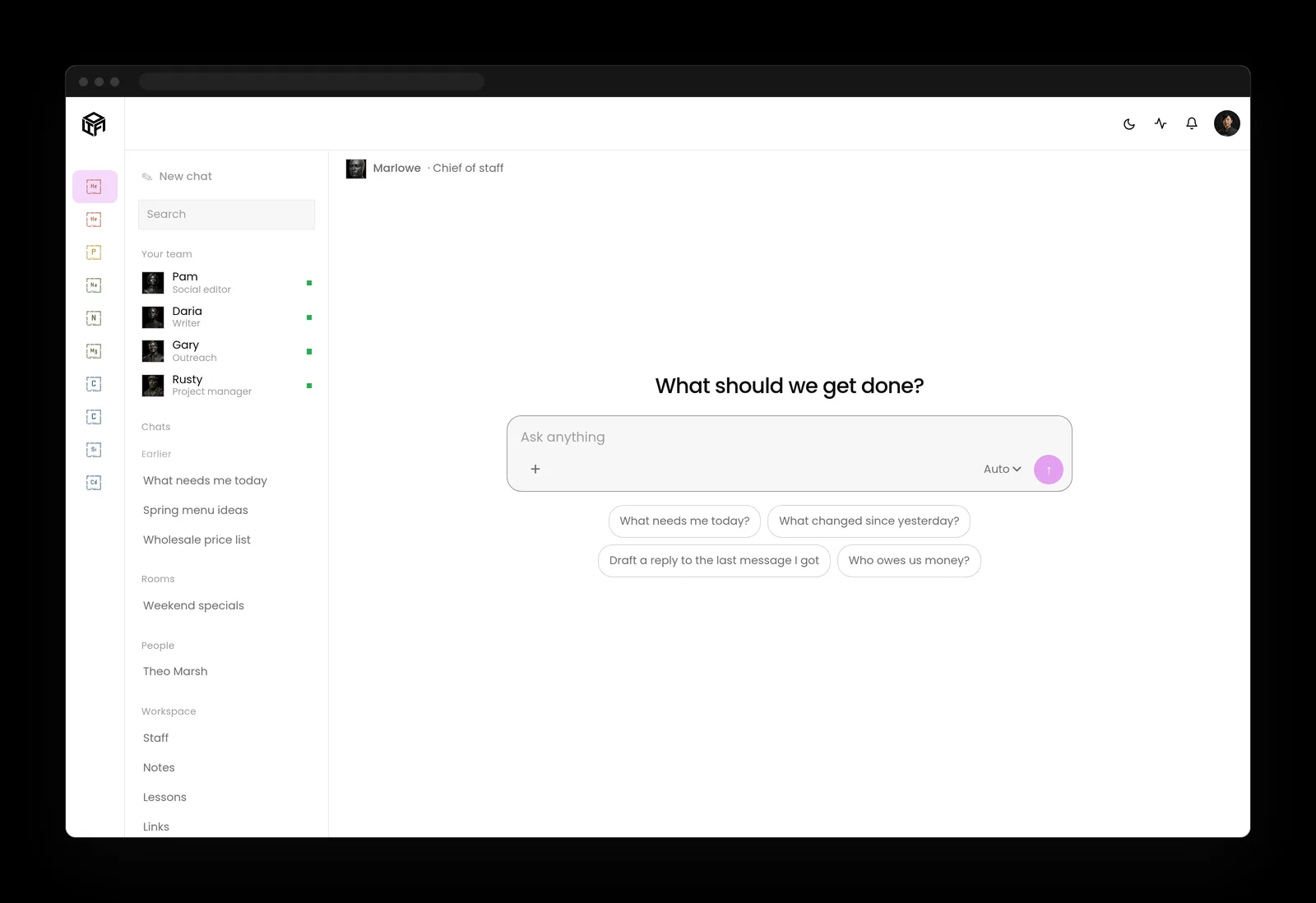
What an agentic business operating system is
Most small businesses already use AI in pieces: a chatbot for drafts, a tool that writes social posts, a meeting note taker. Each one helps, and none of them knows what the others did. An agentic business operating system puts that work in one place, which is why some people call it an AI operating system for business. AI staff take on the routine jobs, they share one memory of your customers and projects, and they work inside rules that you write down.
The word agentic means the AI can act, not only answer. It can draft the follow-up, file the note, prepare the invoice and line up the post. The word business means the subject is your company's work: customers, money, content, projects and support. And operating system means it is the place where that work runs every day, the way your computer's operating system is the place your apps run.
Why an agentic business operating system is not a computer operating system
Search for agentic operating system and you'll find two different ideas. One is software that controls a computer: opening apps, clicking and typing for you. The other, the one this guide is about, runs a company's work. An agentic business operating system cares about who approved a payment and which client an email went to, and it doesn't care which window is open.

What it runs: the work, not the layers
Most explanations of agentic AI start with layers: models, memory, tools and orchestration. That's how it's built, and an owner rarely needs it. The useful question is which jobs it takes off your desk and which ones it hands back to you. Here's how that splits in a small company.
- Customers and follow-ups: the AI drafts the reply, updates the contact and reminds you who has gone quiet. A person approves anything that goes out.
- Invoices and payments: the AI prepares the invoice and matches payments to it. A person approves every payment and every new payee.
- Content and social posts: the AI drafts articles and posts in your voice and schedules them. A person approves what gets published.
- Projects: the AI keeps the task list current, writes the weekly summary and flags what's late. People decide priorities.
- Support: the AI answers routine questions from your own documents and passes anything unusual to a person.
- Reports: the AI pulls the numbers each week and explains what changed. You decide what to do about it.
The AI staff do it
Drafting, sorting, summarizing, updating records, research, preparing invoices and lining up posts.
A person signs it
Sending, posting, publishing, paying, deleting, client messages and changes to who can access what.

How many businesses use AI today
This kind of system is new as a category, but the AI use underneath it is already common, and the numbers depend on who is asking. The U.S. Census Bureau's working paper The Microstructure of AI Diffusion (opens in a new tab), from April 2026, found that 18% of firms used AI in a business function between November 2025 and January 2026, rising to 32% when weighted by employment, and that adoption was expected to reach 22% within six months.
Company size makes a large difference. In the same paper, current use among the largest firms, with 250 or more employees, was 31%, against 40% expected. Firms with 100 to 249 employees were at 25% and expected 34%. The smallest firms, with 1 to 4 employees, were at 18% and expected roughly 21%.
Small employers report more AI use than the Census count
Surveys of small employers report higher use. The Federal Reserve Banks' 2026 Report on Employer Firms (opens in a new tab), from 6,525 responses collected between September and November 2025, found that 46% of small employer firms said the business or its employees used AI, and another 15% planned to start within a year. The two surveys ask different questions of different samples, so read each on its own terms.
Current use is highest in 250 or more at 31%; Expected in six months is highest in 250 or more at 40%.
| Current use | Expected in six months | |
|---|---|---|
| 1 to 4 | 18 | 21 |
| 100 to 249 | 25 | 34 |
| 250 or more | 31 | 40 |
Where small businesses stall
The gap that matters here isn't whether a business uses AI. It's whether that AI is part of how the work gets done. Among the small firms in the Federal Reserve survey that used AI, 44% had partially integrated it into their business processes and only 7% had fully integrated it. Most were still experimenting.
Their own reasons point at the problem. The top challenges for current users were accuracy, named by 46%, and adapting tools to meet business needs, named by 43%. For firms planning to start, the top challenge was finding tools to meet business needs, at 54%. Scattered tools that each do one thing are hard to fit to a real business and hard to check.
The Census paper finds the same narrow use from a different angle: 57% of firms using AI used it in three or fewer business functions, most often Sales and Marketing at 52%, Strategy and Business Development at 45% and IT at 41%.
Firms naming it is highest in Finding tools to meet business needs (planning to use AI) at 54%.
| Firms naming it | |
|---|---|
| Finding tools to meet business needs (planning to use AI) | 54 |
| Accuracy (using AI) | 46 |
| Adapting tools to meet business needs (using AI) | 43 |
AI agents are scaling faster at large companies
AI agents, the part that acts, are spreading unevenly. McKinsey's State of AI in 2026 (opens in a new tab), a survey of 1,719 participants fielded from May 4 to June 8, 2026, found that 40% of respondents from organizations with more than 1 billion dollars in annual revenue reported scaling AI agents, up from 27% a year earlier. Among smaller organizations the share stayed flat at 22%.
That's the opening for a small company. Large firms have teams to stitch agents into their systems. A smaller business needs the stitching done for it, with the rules and approvals already in place, which is the job this kind of system is meant to do.
2025 survey is highest in More than 1 billion dollars in revenue at 27%; 2026 survey is highest in More than 1 billion dollars in revenue at 40%.
| 2025 survey | 2026 survey | |
|---|---|---|
| More than 1 billion dollars in revenue | 27 | 40 |
| Smaller organizations | 22 | 22 |
The parts every agentic business operating system needs
Whatever the product, the same few parts decide whether you can trust it with real work. If one is missing, you'll find out the hard way.
- One shared memory: customers, projects, past decisions and your own documents, so every AI teammate works from the same facts.
- Written rules: what each AI teammate may do alone, what it must ask about, and what it may never do.
- Connections: email, calendar, files, your website and your accounting, each reached with only the access the job needs.
- Approvals: anything that sends, posts, publishes, pays or deletes waits for the person who owns that area.
- An audit trail: every action and every approval written down with a time and a name.
- Budgets that stop spending: a limit the system enforces, so an AI teammate stops when the money runs out.
- People-only controls: rules, permissions, credentials and money that no AI teammate can change.
Approvals and an audit trail are the spine of an agentic business operating system
The joint guidance from the cyber agencies of Australia, the United States, Canada, New Zealand and the United Kingdom, Careful adoption of agentic AI services (opens in a new tab), says to prevent agents from autonomously executing high impact actions without prior human approval, and that decisions about when approval is needed belong to the people who design or operate the system, not to the agent. We explain how to set that up in human approval for AI agents and what to record in the AI agent audit trail.

How it compares with automation, a chatbot and an ERP
People often ask how it differs from the software they already have. The short version: each of those does one kind of job, and this one coordinates the work across them.
Workflow automation
Workflow automation follows fixed steps: when a form arrives, add a row and send an email. It's reliable for what you planned and stuck on anything you didn't. AI staff can read the form, notice it's a complaint and draft a careful reply for a person to approve, while still following your rules.
An AI chatbot
A chatbot answers when you ask and forgets when you close it. It doesn't remember your customers, it can't act without you copying and pasting, and nothing it does is logged. An AI agent can act; a chatbot mostly talks.
An ERP or a CRM
An ERP or a CRM holds your records and waits for people to type. AI staff work on those records: it updates the contact, prepares the invoice and tells you what changed. Many businesses keep their existing systems and connect them.
Workflow automation
Fixed steps you planned in advance. Reliable, and no judgment.
AI chatbot
Answers questions on request. No shared memory, no actions, no log.
ERP or CRM
Holds the records and waits for people to do the work.
Agentic business operating system
AI staff do the routine work across those tools, inside written rules, with approvals and a log.
What can go wrong, and the controls that answer it
Giving software the power to act is useful and it's risky, and the honest guides say both. The OWASP GenAI Security Project's Top 10 for Agentic Applications (opens in a new tab) lists the ways agents fail in the real world, from agent goal hijack to rogue agents. Three matter most to a small business.
- Tool misuse (ASI02): an agent uses a real permission for the wrong thing. The control is human confirmation for high-impact actions such as delete, transfer and publish.
- Identity and privilege abuse (ASI03): an agent holds more access than its job needs. The control is least privilege, one job and one scope at a time.
- Human-agent trust exploitation (ASI09): people trust a polished draft too readily. The control is an approval that shows exactly what will happen and makes no as easy as yes.
Cost and accuracy
Two everyday problems matter as much as attacks. About 20% of respondents in McKinsey's 2026 survey said AI-related operating costs constrained their AI use, which is why budgets that stop spending belong in the system. And accuracy topped the small firms' list of challenges at 46%, which is why a person checks anything that leaves the business.

How to evaluate an agentic business operating system
You don't need to understand the technology to judge one, and the questions double as the start of your own AI governance. Ask these questions in a demo and watch what happens on screen, not what the slides say.
Match it to the NIST AI Risk Management Framework
If you want a standard to measure against, the NIST AI Risk Management Framework (opens in a new tab) is voluntary and built around four functions: Govern, Map, Measure and Manage. The questions above sit mostly under Govern and Manage.
- Who approves what?. Ask to see an approval request. It should show the full email, post or payment and name the one person who can approve it.
- Can it stop spending?. Ask what happens when a budget runs out. The answer should be that the work stops, not that you get an alert later.
- Can you read and export the log?. Every action and approval should be in a log you can search and take with you.
- What can only a person do?. Rules, permissions, credentials and money should be out of reach for every AI teammate.
- Where does your data live?. Ask where your records are kept, who can reach them and how you'd leave with them.
- Who runs it?. Ask who keeps it working when something breaks, and whether anything has to be installed on your computers.
Does a small company need an agentic business operating system?
Not always. If you use AI for an occasional draft, a good chatbot is enough. This kind of system starts to pay off when the same routine work happens every week, when more than one person or tool touches it, and when you need to know afterwards who sent what.
The right way to start is small: one routine job, such as follow-ups or the weekly report, with every outward step set to ask. You loosen one kind of work at a time as you trust it. If you'd rather have it set up and run for you, Kief Studio's managed services (opens in a new tab) do exactly that for small and mid-size businesses.
How LTFI works as an agentic business operating system
LTFI is the agentic business operating system Kief Studio built and runs its own company on. Its home page and what it does cover the product. In short:
- AI staff handle routine work across contacts, projects, content, support and reports, sharing one memory.
- Posting, sending mail, publishing, client messages, spending and changes to a site wait for the person who owns that area, in one queue that works on a phone. The page on AI staff with approvals shows it.
- Every action by the AI staff and the team is written to the activity log, newest first, with who said yes.
- Rules, approvers, permissions, credentials and money stay with people.
- Kief Studio hosts and runs it, so nothing is installed at your end.
What to do this week if you're considering one
Two lists: one for the person who owns the business, one for whoever runs its systems.
If you own the business
- List the five routine jobs that take the most time each week.
- Mark which of them send, post, pay or delete, and decide who should approve those.
- Ask any vendor to show you an approval request and the log in a live demo.
- Start with one job, and review it after a month before adding the next.
If you run the systems
- Inventory the AI tools already in use, including the ones staff added on their own.
- Give each AI teammate its own identity and only the access its job needs.
- Confirm approvals are enforced by the system, not by the agent's instructions.
- Check that the log records every action and approval with a time and a name, and that you can export it.
Key takeaways
- An agentic business operating system is where AI staff do a company's routine work inside written rules.
- It runs the business, not a computer: customers, money, content, projects and support.
- Approvals, an audit trail, budgets that stop spending and people-only controls are what make it safe to use.
- Small businesses use AI widely but rarely integrate it; that gap is what this kind of system is for.
Where this lines up with the standards
The frameworks and rules this page maps to, with the exact item and what it asks of you.
| Framework | Item | What it asks |
|---|---|---|
| OWASP Top 10 for Agentic Applications | ASI02 Tool Misuse, ASI03 Identity and Privilege Abuse, ASI09 Human-Agent Trust Exploitation (opens in a new tab) | Confirm high-impact actions with a person, keep each agent's access to its job, and design approvals people actually read. |
| Joint agency guidance | Careful adoption of agentic AI services (opens in a new tab) | Require prior human approval for high-impact actions, and let people, not agents, decide where approval applies. |
| NIST AI RMF | Govern, Map, Measure, Manage (opens in a new tab) | Set policies and owners, know where AI acts, measure how well it does, and manage the risks you find. |
| NIST CSF 2.0 | PR.AA-05 access permissions (opens in a new tab) | Define, manage and review access with least privilege and separation of duties. |
| Massachusetts | 201 CMR 17.00 and M.G.L. c. 93H (opens in a new tab) | Restrict and monitor access to personal information, and be ready to report a breach. |