

The short answer
You can let AI send emails for you, but start with drafts that a person approves. Once a kind of routine message has gone out unchanged many times, let that one kind send on its own. Anything involving money, contracts, an upset client or someone new should always wait for a person.


Published Last updated
Should you let AI send emails? The short version
Most owners who ask this have already seen an AI write a decent email. The writing isn't the hard part anymore. The question is whether the email should go out without anyone reading it first, under your name, to your clients.
My answer for almost every small business: let it draft everything it's good at, and have a person press send. That one step catches the wrong attachment, the reply to the wrong thread, the promise you can't keep and the reply to a scammer. It costs a few seconds per email. After a while you'll see which kinds of email you approve without changing a word, and those are the ones that can start going out on their own.
When to let AI send emails without asking
Only for one kind of routine message at a time, after you've approved it unchanged many times, to people who already expect it. Appointment confirmations and internal reminders are good examples. That permission is called a standing approval, and you should be able to see it and take it back in one step.
What the permission to send really allows
When an AI tool asks to connect to Google mail, the permission screen tells you what it wants. Google publishes the wording on its list of Gmail permissions (opens in a new tab), and two lines on it surprise people.
The first is the send permission, which reads "Send email on your behalf." Google puts it in its Sensitive class. The permission to read your mail sits in the stricter Restricted class. So in Google's own classification, permission to send sits in a lighter class than permission to read, even though a sent email can't be called back.
The second is the drafting permission, which reads "Manage drafts and send emails." A tool that tells you it only writes drafts may be holding a permission that can also send them. That's not a sign anyone is lying to you. It's a reason to read the screen and ask the vendor what the tool actually does with that access.
Sending is the step that leaves the building
Everything else an AI does with your mail stays inside your business until something is sent. A bad summary wastes a minute. A bad email reaches a client, a supplier or a stranger, and it goes out under your name. Amelia, my wife and co-founder, covers the reading side in is it safe to let AI read your email.

What goes wrong when you let AI send emails alone
Here are the bad days we see owners worry about, and the ones they don't see coming.
A wrong email to a client
The most common failure when you let AI send emails is ordinary. The AI replies to the wrong person in a long thread, attaches last year's price sheet, agrees to a date nobody can meet, or answers an angry client in a cheerful tone. None of it is malicious, and all of it is caught by a person reading the draft (opens in a new tab) before it goes.
A stranger's email gives the orders
An AI that reads incoming mail and can also send is the combination security people worry about most. The OWASP GenAI Security Project describes it in its entry on excessive agency (opens in a new tab): an assistant connected to a mailbox to summarize mail, given a tool that can also send, and a malicious email that gets it to forward the user's sensitive data to an attacker. That's prompt injection, instructions hidden in content the AI reads.
NIST tested the same idea in its agent hijacking evaluations (opens in a new tab), released January 17, 2025 and updated December 19, 2025. Its test tasks included "Sending an innocuous email to an untrusted recipient" and emailing the user's five largest files to one. Against the model it tested, the success rate went from 11% to 81%, comparing the strongest existing attack with the strongest new one from its red team. When sending waits for a person, a hijacked draft is just a draft you decline.
Your AI answers a scammer
Business email compromise is the FBI's term for scams aimed at businesses that pay suppliers by wire. Its 2025 Internet Crime Report (opens in a new tab) counts 24,768 complaints and more than 3 billion dollars in losses from it last year, and says businesses reported losses over 30 million dollars to these scams involving AI. A tool that politely confirms an invoice, sends a tax form or replies with bank details to whoever asks is doing the scammer's work for them.

Which emails AI can send alone, and which never
Before you let AI send emails of any kind, sort them. The line I use is simple. Ask two questions about a kind of email: would it matter if it went to the wrong person, and could I take it back if it said the wrong thing? If the first answer is yes or the second is no, a person reads it before it goes.
The joint guidance from the cyber agencies of Australia, the United States, Canada, New Zealand and the United Kingdom, Careful adoption of agentic AI services (opens in a new tab), published May 1, 2026, points the same way. Its full text (opens in a new tab) recommends that organizations "Prevent agents from autonomously executing high impact actions or outputs without prior human approval" and names "an email assistant with write access to any inbox" as an example of overly broad permissions.
Can go out on its own, once proven
Appointment confirmations, receipts the client asked for, internal reminders, and routine replies you've approved unchanged many times.
Always waits for a person
Anything about money or bank details, quotes, contracts, complaints, legal or medical matters, a first email to someone new, and anything sent to a whole list.
Draft, approve, then send: how to set it up
You can set this up this week, before you let AI send emails to anyone outside the business, without buying anything new. The order matters, because each step depends on what you learned in the one before it.
Google's own security team builds the same idea into its products. Its post on layered defenses against prompt injection (opens in a new tab) lists a "User confirmation framework" as one layer, where "potentially risky operations like deleting a calendar event may trigger an explicit user confirmation request." Sending an email to a client is at least as risky as deleting a meeting.
Draft and approve without slowing down
The worry is always that approvals will make you slower. In our experience it's usually quicker than writing the email yourself, because the drafts arrive written and you only read and press a button. Keep the requests few and clear so people actually read them; our page on human approval for AI agents covers approval fatigue and how to avoid it.
Drafts only
The AI writes replies into a queue. Nothing leaves until a named person presses send.
One owner per mailbox
Decide who approves client email, who approves billing email, and who approves everything else.
Watch what you change
For a month, notice which kinds of draft you approve without edits.
Loosen one kind at a time
Give a standing approval to one routine kind of email, write it down, and set a date to look at it again.
Keep the record
Every email sent, and who approved it, goes in one log you can read.

Marketing email: the law still points at you
If you let AI send emails that promote your business, the rules for commercial email apply to every one of them. The FTC's CAN-SPAM compliance guide (opens in a new tab) says you "can't contract away your legal responsibility to comply with the law," even when another company sends for you, and it notes the law "makes no exception for business-to-business email." Penalties apply to each separate email.
An AI tool doesn't change who's responsible. Keep marketing sends behind a person's approval, check the unsubscribe link and your business address in every template, and don't let an AI build lists from contacts who never asked to hear from you.
If the AI sends under your name
Staff get the least say in this and carry a lot of the risk. If your employer decides to let AI send emails from your mailbox, the client sees your name on every one of them.
- Ask which of your emails the AI can send without you, and get the answer written down.
- Read every draft that goes out under your name until you trust that kind of message.
- If a client replies to something you didn't write, tell your manager the same day.
- Don't connect your own AI tool to a work mailbox to save time. Ask for the approved one.
Massachusetts: when sent mail carries personal information
Before you let AI send emails from a Massachusetts business, look at what they carry. Emails a business sends often include what Massachusetts law calls personal information: a resident's name with an account number, a card number or an ID number. Under the state's data security rule, a company that handles that information for you is a service provider (opens in a new tab), and Section 17.03 (opens in a new tab) requires you to have it agree "by contract" to keep appropriate security measures. That likely includes the AI tool that sends your mail. Add it to your written information security program; Amelia's guide to Massachusetts WISP requirements (opens in a new tab) covers what the program needs.
How LTFI handles it when you let AI send emails
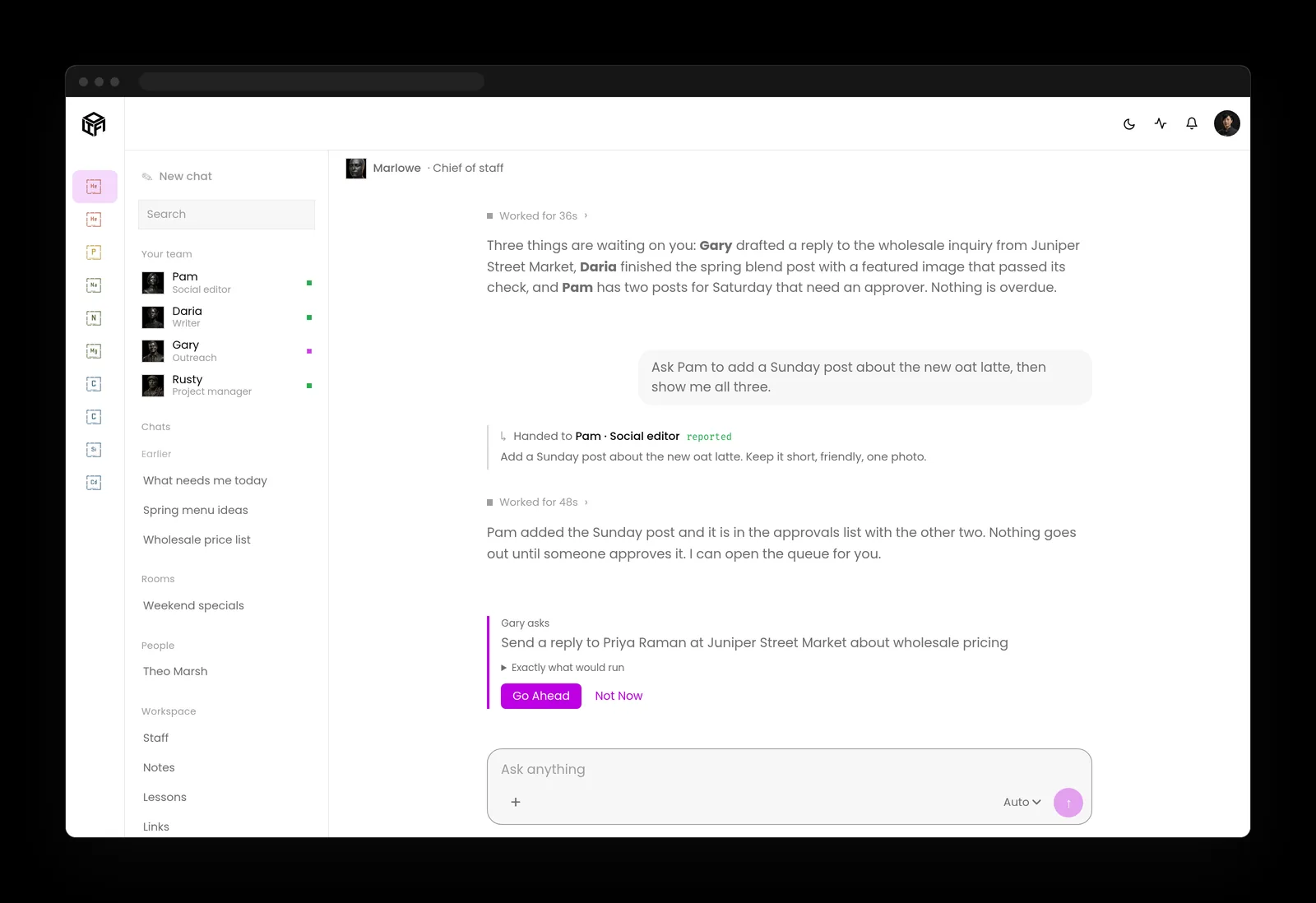
LTFI is the agentic business operating system Kief Studio makes and runs, and it's how we run our own company. Sending is the step it never takes on its own unless you've said so.
- Sending mail, client messages, posting, publishing and spending wait for the person who owns that area. The default is to ask.
- Everything waiting lands in one queue, Waiting on you, and it works on a phone.
- When you trust a kind of email, you can tell LTFI to stop asking about it. That becomes a standing approval you can see and take back at any time.
- Rules, permissions and credentials stay with people. An AI teammate can't change them.
- The activity log records every action by the staff and the team, newest first, with who approved it.

What to do this week
Two lists: one for the person who owns the business, one for whoever runs its systems.
If you own the business
- Find out which tools can send from your business mailboxes today.
- Set every one of them to draft only, and name who approves each mailbox.
- Write down the kinds of email that must always wait for a person.
- After a month, choose one routine kind of email for a standing approval.
If you look after the accounts
- Check the permission each AI tool holds, and remove send access from tools that only need to read.
- Make sure approvals happen in the system that sends, not in the AI's instructions.
- Keep a log of every sent email with the name of the person who approved it.
- Review standing approvals once a month and take back any that nobody uses.
Key takeaways
- Let AI send emails only after a person approves them, at least at the start.
- A tool that says it only drafts may still hold a permission that sends.
- Money, contracts, complaints and first contact always wait for a person.
- Give standing approvals one routine kind of email at a time, and keep a log of every send.
Where this lines up with the standards
The frameworks and rules this page maps to, with the exact item and what it asks of you.
| Framework | Item | What it asks |
|---|---|---|
| OWASP Top 10 for LLM Applications | LLM06 Excessive Agency (opens in a new tab) | Don't give a tool that reads mail the power to send it, and have a person approve high-impact actions. |
| Joint agency guidance | Careful adoption of agentic AI services (opens in a new tab) | Prevent agents from taking high-impact actions without prior human approval. |
| NIST CAISI | Agent hijacking evaluations (opens in a new tab) | Plan for hidden instructions that try to make an agent email someone it shouldn't. |
| FTC | CAN-SPAM Act compliance guide (opens in a new tab) | Keep responsibility for every commercial email, whoever or whatever sends it. |
| Massachusetts | 201 CMR 17.00 (opens in a new tab) | Bind any AI tool that sends residents' personal information by contract, as a service provider. |